The REST API lets you start audits and fetch results from your own systems, for example re-testing your chatbot every time you deploy a new prompt. Webhooks push audit events to your tools as they happen, so a score drop can open a ticket or post to your team chat without anyone checking the dashboard.
Before you start
- API tokens need a plan that includes API access. On other plans, the token card says API access is available on higher plans.
- Webhooks are managed by workspace Owners and Admins.
- You need a website and a chatbot connection to start audits. See Connect your chatbot.
- Webhook endpoints must use HTTPS and be reachable from the public internet.
Step by step
1. Create an API token
Open the user menu at the top right and click Account settings. In the API tokens card, enter a Token name and choose its abilities:
- Read: all GET endpoints.
- Write: create websites and webhooks, start crawls, pause or resume schedules.
- Run audits: generate tests, start audits and test connections. These use your plan allowances and AI credits.
Click Create. Copy the token from Copy your new token now: it is shown only once. To revoke a token later, click Revoke next to it.
2. Call the API
The base URL is https://<your-domain>/api/v1. Send the token on every request:
Authorization: Bearer <token>
Accept: application/json
Useful endpoints (all workspace endpoints sit under /workspaces/{workspace}):
| Method | Path | Ability | What it does |
|---|---|---|---|
| GET | /workspaces |
read | Your workspaces and roles |
| GET | /workspaces/{w}/websites |
read | List websites |
| GET | /workspaces/{w}/connections |
read | Chatbot connections (no secrets) |
| POST | /workspaces/{w}/runs |
run | Start an audit |
| GET | /workspaces/{w}/runs/{id} |
read | Status, progress and report_id when finished |
| GET | /workspaces/{w}/reports/{id} |
read | Scores, issues and fixes |
| POST | /workspaces/{w}/schedules/{id}/toggle |
write | Pause or resume a schedule |
To start an audit from a deployment pipeline:
curl -s -X POST https://<your-domain>/api/v1/workspaces/12/runs \
  -H "Authorization: Bearer $TOKEN" -H "Accept: application/json" -H "Content-Type: application/json" \
  -d '{"website_id":34,"chatbot_connection_id":56,"category_keys":["knowledge","business"]}'
Then poll GET /workspaces/12/runs/{id} until the status is completed or failed, and fetch the report by its report_id.
Responses wrap results in data (with meta for paginated lists). The default limit is 60 requests per minute; above it you get 429 with a Retry-After header. A 403 means a missing plan feature, a reached limit or a missing token ability. A 404 means the resource does not exist or belongs to another workspace.
3. Add a webhook
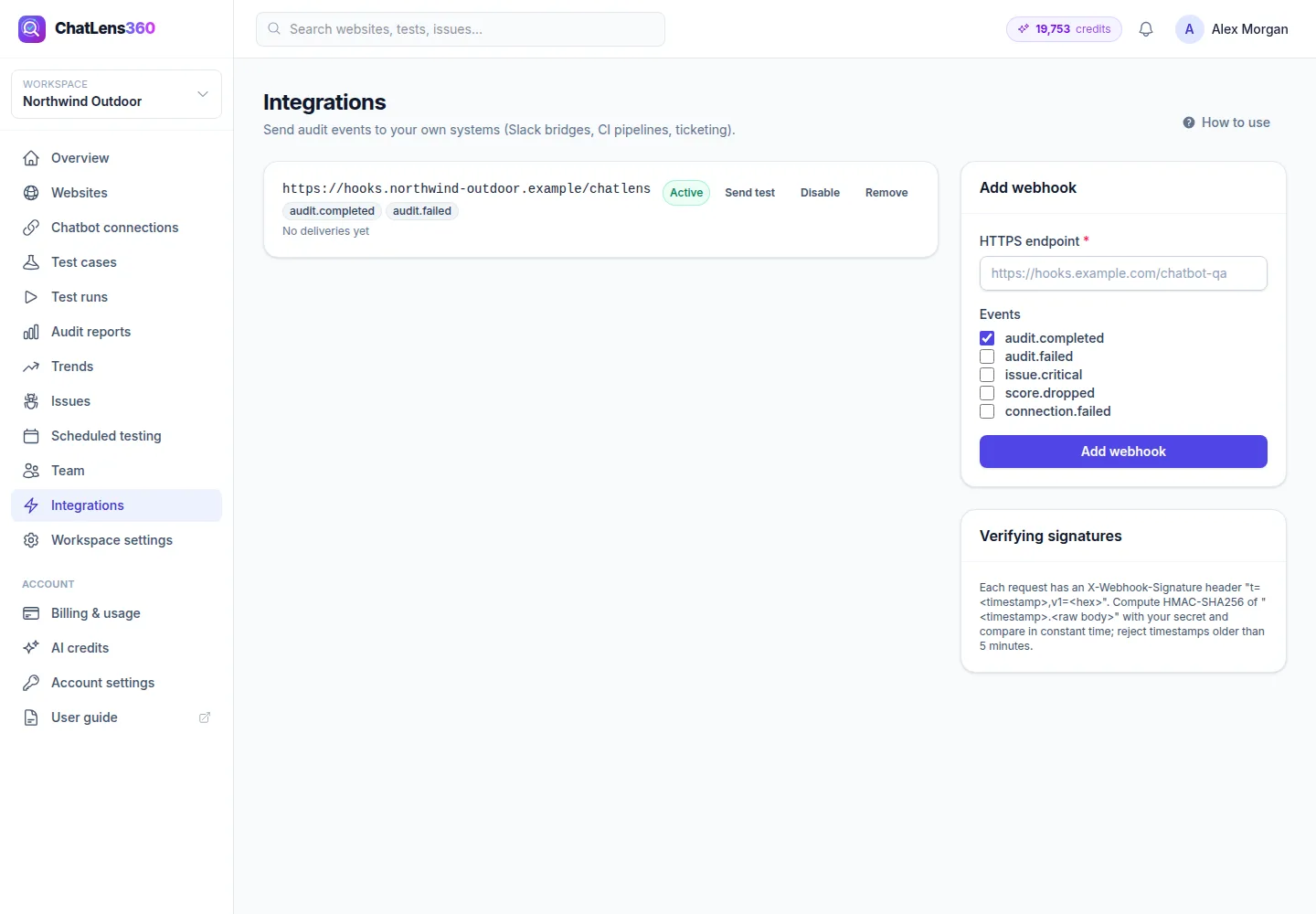
In the left sidebar, click Integrations. In the Add webhook card, enter your HTTPS endpoint and tick the Events you want:
audit.completed: an audit finished, with the overall score and issue counts.audit.failed: an audit could not finish.issue.critical: an audit found critical issues.score.dropped: the health score fell by 5 points or more, or tests that used to pass now fail.connection.failed: your chatbot connection stopped working.
Click Add webhook. Copy the Signing secret (shown once) right away.
4. Verify signatures
Every request includes X-Webhook-Event, X-Webhook-Id and X-Webhook-Signature: t=<timestamp>,v1=<hex>. To verify it, compute HMAC-SHA256 of "<timestamp>.<raw body>" with your secret, compare it to v1 in constant time, and reject timestamps older than 5 minutes.
[$t, $v1] = [/* parse t= and v1= from the header */];
$expected = hash_hmac('sha256', $t.'.'.$rawBody, $secret);
$valid = hash_equals($expected, $v1) && abs(time() - (int) $t) <= 300;
5. Test and manage webhooks
Click Send test to send a ping event. Each webhook card shows its last delivery, recent response codes and any consecutive failures. Use Disable or Enable to pause deliveries, and Remove to delete the webhook.
Tips
- Re-run a focused audit after every prompt or knowledge change in your pipeline, and fail the deployment if the score drops. This stops regressions before customers see them.
- Give each system its own token with only the abilities it needs, so you can revoke one without breaking the others.
- Route
issue.criticalandscore.droppedto the channel your support lead watches. - Use the
X-Webhook-Idheader to ignore duplicate deliveries.
Troubleshooting
- "This token lacks the 'run' ability.": create a new token with Run audits ticked.
- Webhook shows consecutive failures: your endpoint must return a 2xx response. Failed deliveries are retried 5 times, and an endpoint is disabled after 20 failures in a row. Fix it, click Enable, then Send test.
- The endpoint URL is rejected: it must start with
https://and point to a public address, not a private or local network.
Related guides
Still stuck? Contact us and we will help, or let our team set it up and fix it for you.